Run Your Service Business From One System
Point of sale, payment links, customer records, inventory, a time clock and reports — for locksmiths, plumbers, HVAC techs and other service businesses. $79 a month for the whole business, with unlimited users.
30 days free. A card is required; cancel in Settings → Billing before day 31 and you pay nothing. Prefer a walkthrough? Book a live demo.
Keep QuickBooks and your payment processor.
IntelliDrive OS runs the counter and the van. Customers pay through your own QuickBooks Payments, Square or Stripe account, and you push sales and payments to QuickBooks Online when you’re ready.
Six Parts, One System
They share the same customers, stock and sales.
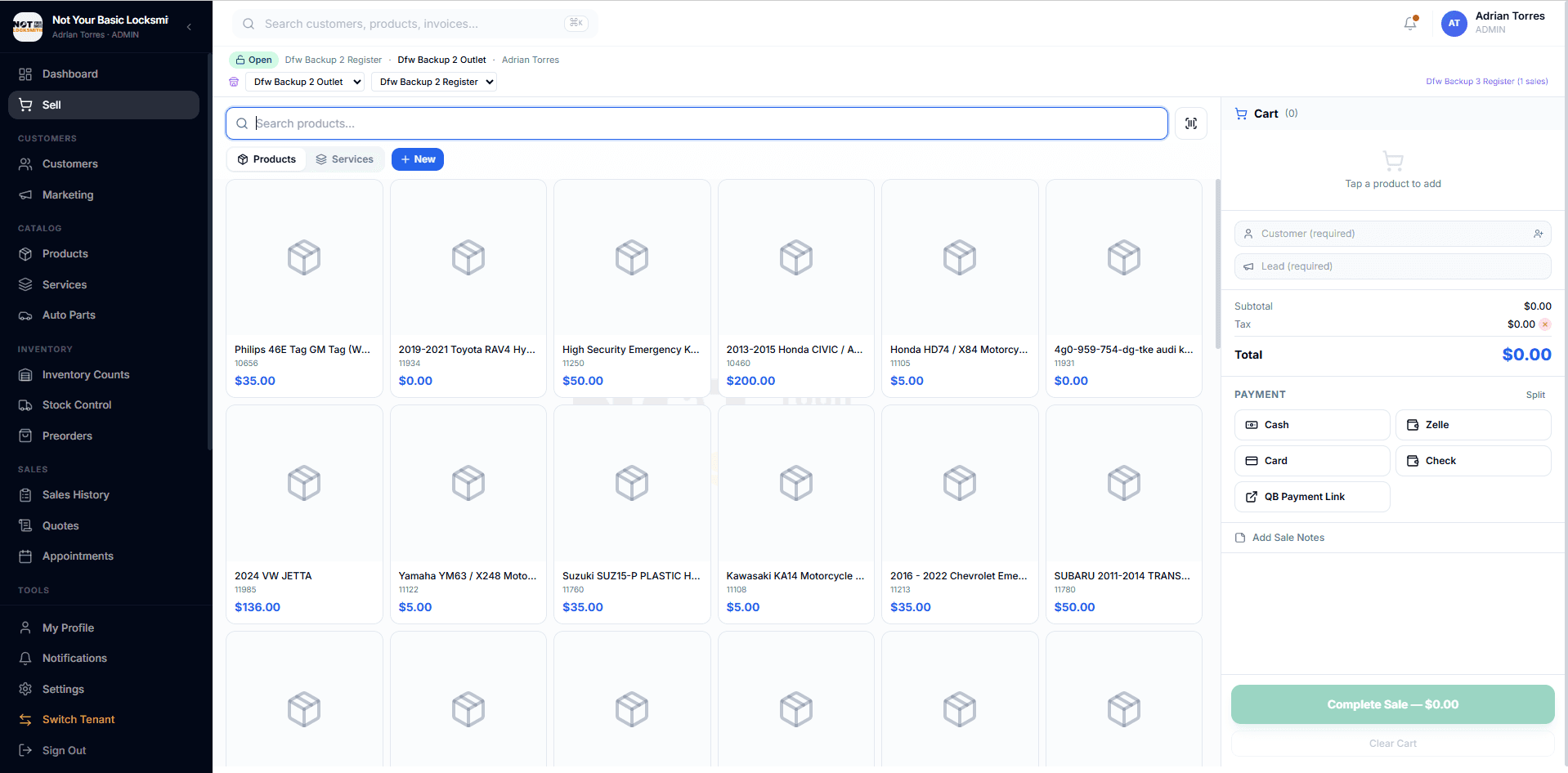
Point of Sale
Barcode scanning with a phone camera, product and service tabs, split payments, deposits and preorders, and receipts by email or text.
Customers & Billing
Customer history and VIP tags, on-account credit, and dealer and fleet billing with PO numbers and statements.
Inventory
Stock for every shop and van, counts with an audit trail, exact transfers, part orders with tracking, and reorder alerts in the app.
Payment Links
Text or email a link that runs through your own QuickBooks Payments, Square or Stripe account. The customer signs, accepts your terms and can add a tip.
Time Clock & Pay
GPS clock-ins, weekly timesheet approval, pay rates, overtime, tips and commission: the numbers you need for payroll.
Reports
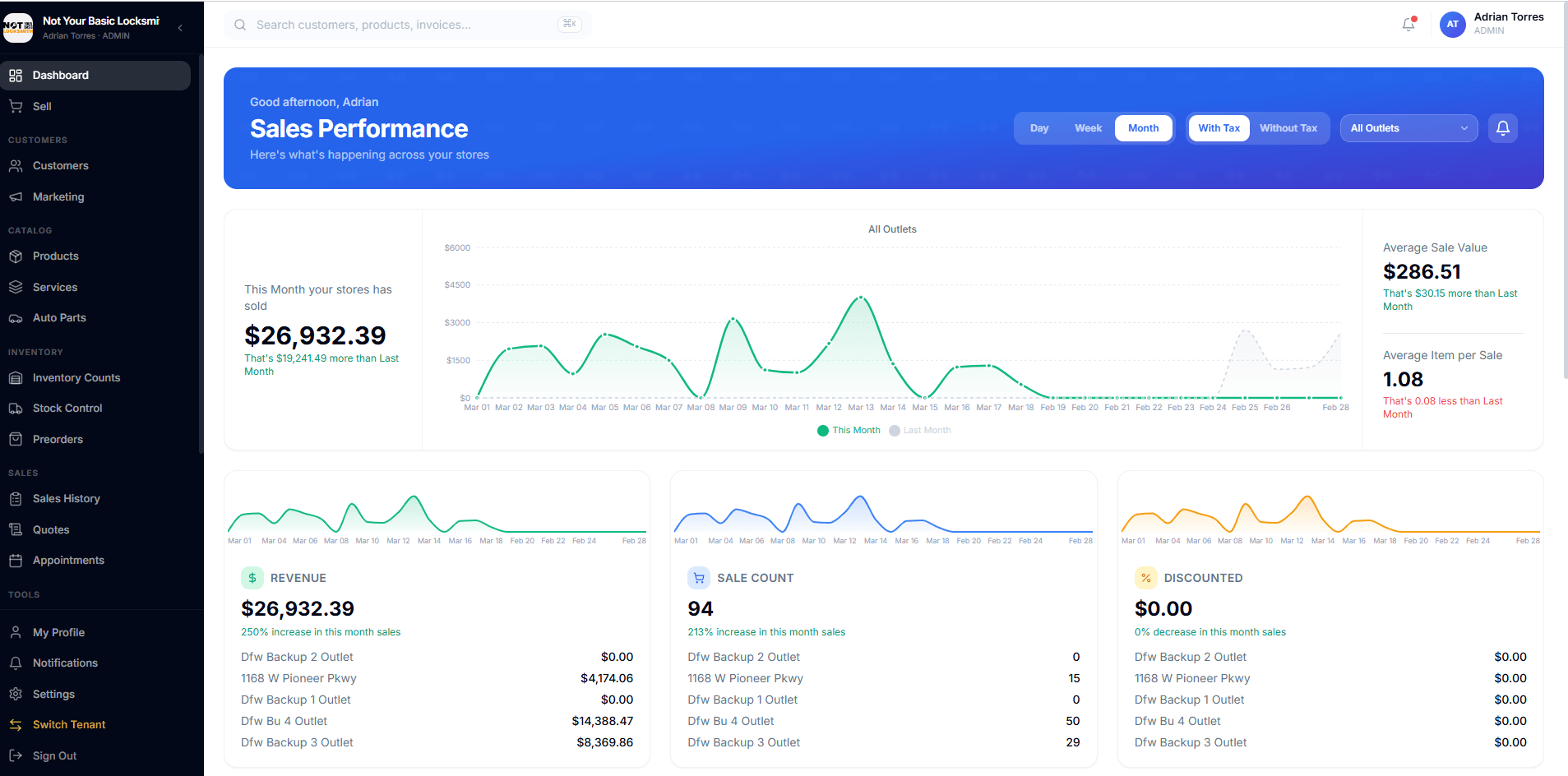
A Business Overview of every sale, profit by FIFO, LIFO or average cost, an optional end-of-day text and an optional monthly owner email.
Every IntelliDrive feature is in the one $79 plan. Scheduling & dispatch is the optional GetTimePad add-on ($199/month). See pricing
More Than a Register
Tools most shops buy separately, already in IntelliDrive OS.
Workforce time & pay
Clock in and out with GPS, breaks and correction requests, weekly timesheet approval, pay rates, overtime, tips and a weekly commission email.
How it worksSquare chargeback defense
Square disputes are copied in, matched to the sale and given an evidence packet, with a deadline email, a 48-hour reminder and the rebuttal sent from the app.
How it worksDealer & fleet billing
Bill a dealership or fleet for work on its customer’s vehicle, with PO numbers, receipts and statements.
How it worksInventory counts & transfers
Count by scanner, phone camera or typing, see shrinkage in dollars, audit past counts, fix them in one click, and move stock between shops and vans.
How it worksAI expenses & mileage
Photograph a receipt and it becomes an expense; photograph the odometer for mileage. Fuel buys and vendor addresses are checked for you.
How it worksSecurity & roles
Optional two-factor sign-in with a second check for voids, refunds and stock changes, 32 permissions, custom roles and an audit log.
How it worksOnline store
Year/Make/Model fitment search, FCC ID and OEM part pages, discount codes, checkout and shipping. Set up with you on request.
How it worksScheduling & dispatch (add-on)
The GetTimePad add-on, $199/month: scheduling, dispatch, route ordering for each tech’s day, live GPS, ETA texts, Tech Mode, and asking every customer for a review.
How it worksAI That Reads the Paperwork
Photograph a receipt, an odometer or a supplier invoice. IntelliDrive reads it and fills in the record for you to check.
Receipts become expenses
A photo of a fuel or parts receipt becomes an expense, filled in for you to review.
Supplier invoices become purchase orders
Scan a supplier invoice and its lines come in as a purchase order you can check before receiving.
Mileage and fuel checks
Photograph the odometer to log mileage. Fuel buys are checked, and the GPS location is compared with the vendor’s address.
Get Paid by Text or Email
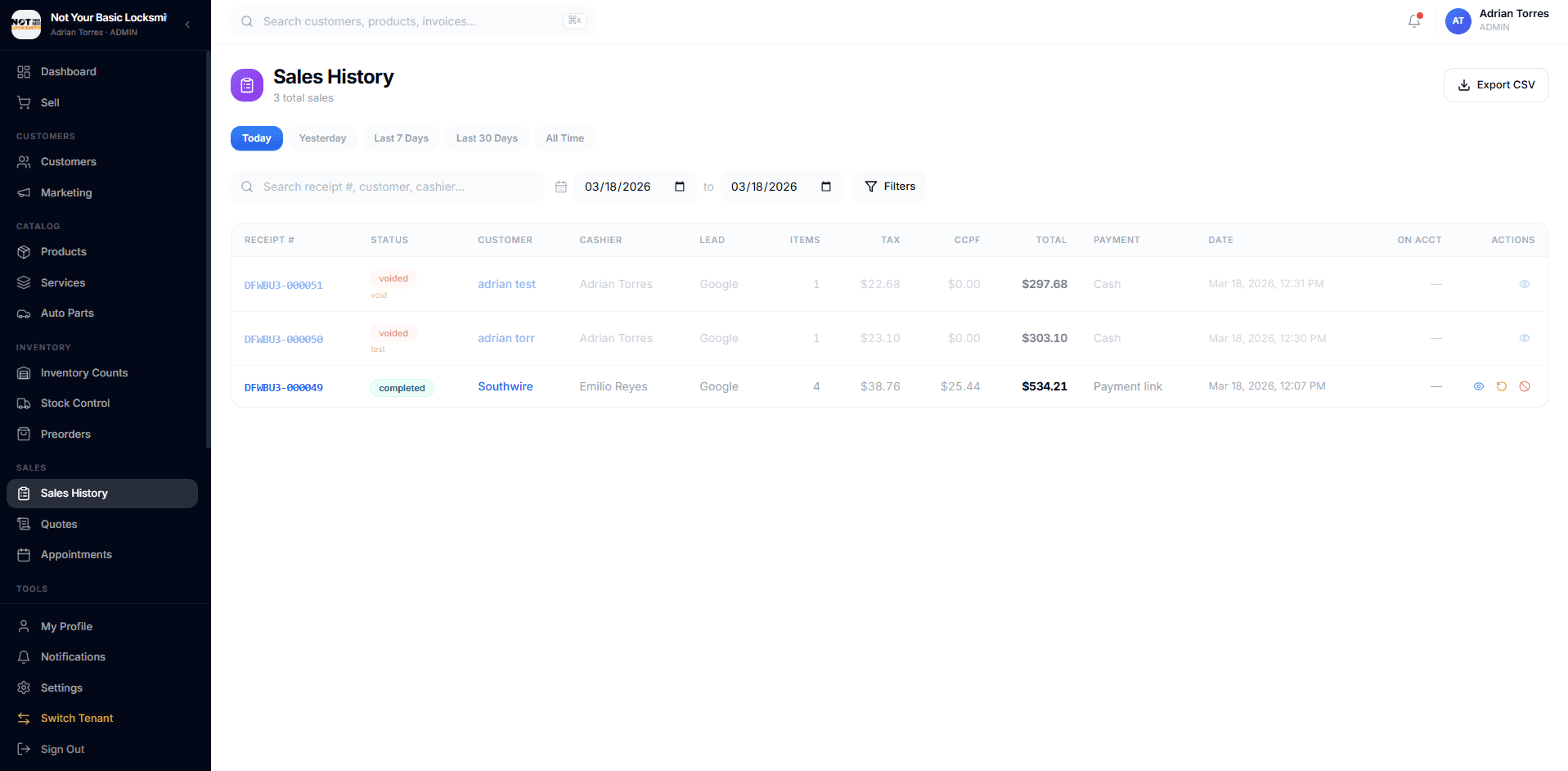
Send a payment link from the sale. The customer opens it on their phone, signs, accepts your terms, adds an optional tip and pays through your own QuickBooks Payments, Square or Stripe account.
- Payment links by text or email
- Deposits and preorders, with the balance due at pickup
- Tips of 15%, 20%, 25% or a custom amount
- Sales and payments pushed to QuickBooks Online when you choose (one-way)
Try it on your own business for 30 days
Your own account, loaded with sample data. A card is required; nothing is charged until day 31.
Know What’s on Every Shelf and in Every Van
Stock levels for each shop and van, reorder alerts in the app, counts you can audit, and transfers that show the before and after.
- Stock by shop and by van, with exact transfers between them
- Reorder alerts in the app when an item reaches its reorder point
- Counts by scanner, phone camera or typing, with shrinkage in dollars and a one-click fix
- Auto parts catalog with FCC IDs and OEM part numbers
Your Business, at a Glance
Reports in the app, plus an optional end-of-day text and an optional monthly email.
End-of-day text
An optional daily text with the day’s sales, revenue, net profit, average ticket, top technician and low-margin jobs.
Business Overview
Every sale by month, week, weekday, hour, kind of work, technician, payment method, vehicle make and customer, with an optional monthly owner email.
Margin & commission
Cost of goods by FIFO, LIFO or average cost, profit per sale, commission per technician and a weekly commission email.
Evidence Collected Before They Pay
On a payment-link sale, the customer signs and accepts your terms before the Pay button unlocks. IntelliDrive keeps that record with the sale, so you have evidence to send if a charge is disputed. It’s evidence, not a guarantee of the outcome.
Signature
The customer signs on their own screen before paying. The signature is kept with the sale and in the proof PDF.
Accepted terms
The customer accepts terms that match the sale: a completed job, a service-call deposit or a part order.
IP address & device
The IP address and device details are recorded with the signature.
Location, when shared
If the customer’s browser shares its location, the coordinates and their accuracy are recorded, with a map link.
Photos
Up to five photos can be attached to the proof and appear in the PDF.
Proof PDF & access log
A proof PDF is saved to the customer’s Photos & Docs, and an access log records when the link was opened, signed and paid.
How It Works
Send the payment link
When the job is done, the technician sends a payment link by text or email.
The customer opens it
The customer sees the business name and a summary of what they are paying for.
Sign and accept the terms
The customer signs on their screen and accepts terms that match the sale. Pay stays locked until they do.
Pay
The customer pays on your QuickBooks Payments, Square or Stripe checkout, with an optional tip.
Proof saved
A proof PDF with the signature, terms, IP address and device is saved to the customer’s Photos & Docs.
Comparing Field Service Software?
Side-by-side looks at the tools service businesses ask us about most.
Simple, Transparent Pricing
One plan for the whole business. Every IntelliDrive feature.
IntelliDrive OS
Billed monthly · unlimited users · 30 days free (card required)
- Point of sale & receipts
- Payment links through your own processor
- Chargeback evidence on payment-link sales
- Customers, on-account credit & dealer billing
- Quotes, invoices & warranty records
- Inventory across shops & vans
- Counts, transfers & part orders
- Time clock, timesheets & commission
- Expenses with receipt reading
- Reports & daily owner text
- QuickBooks Online push (one-way)
- Two-factor sign-in & role permissions
- English & Spanish
- Unlimited users
Optional add-on: GetTimePad scheduling & dispatch, $199/month. Payment processing fees are set by your QuickBooks Payments, Square or Stripe account. Cancel anytime in Settings → Billing.
Start Running Your Business From One System
Your own account, loaded with sample data. 30 days free; a card is required and nothing is charged until day 31.
Built for Every Service Business
Locksmiths, plumbers, HVAC companies, electricians and more. Explore your industry.
Common Questions About IntelliDrive OS
What is IntelliDrive OS?
How much does IntelliDrive OS cost?
How does IntelliDrive OS help locksmiths?
Does IntelliDrive OS work on phones?
Does IntelliDrive OS work without internet?
How does chargeback evidence work?
Does IntelliDrive OS integrate with QuickBooks?
Can I manage more than one location?
What industries is IntelliDrive OS for?
IntelliDrive OS, ahora en español
Maneje su negocio en su idioma. Toda la aplicación está disponible en español: cambie entre inglés y español desde Configuración o desde su perfil, sin perder ningún dato.
- Punto de venta y cobros en español
- Clientes e inventario
- Cotizaciones, facturas y garantías
- Reportes y panel del dueño